Free during the beta

A reservation system for restaurants

Guests book a table themselves, any time, from your website. You see the whole evening on one screen: who is coming, at which table and how many seats are left. No paper diary and no commission per guest.

Tonight on one screen

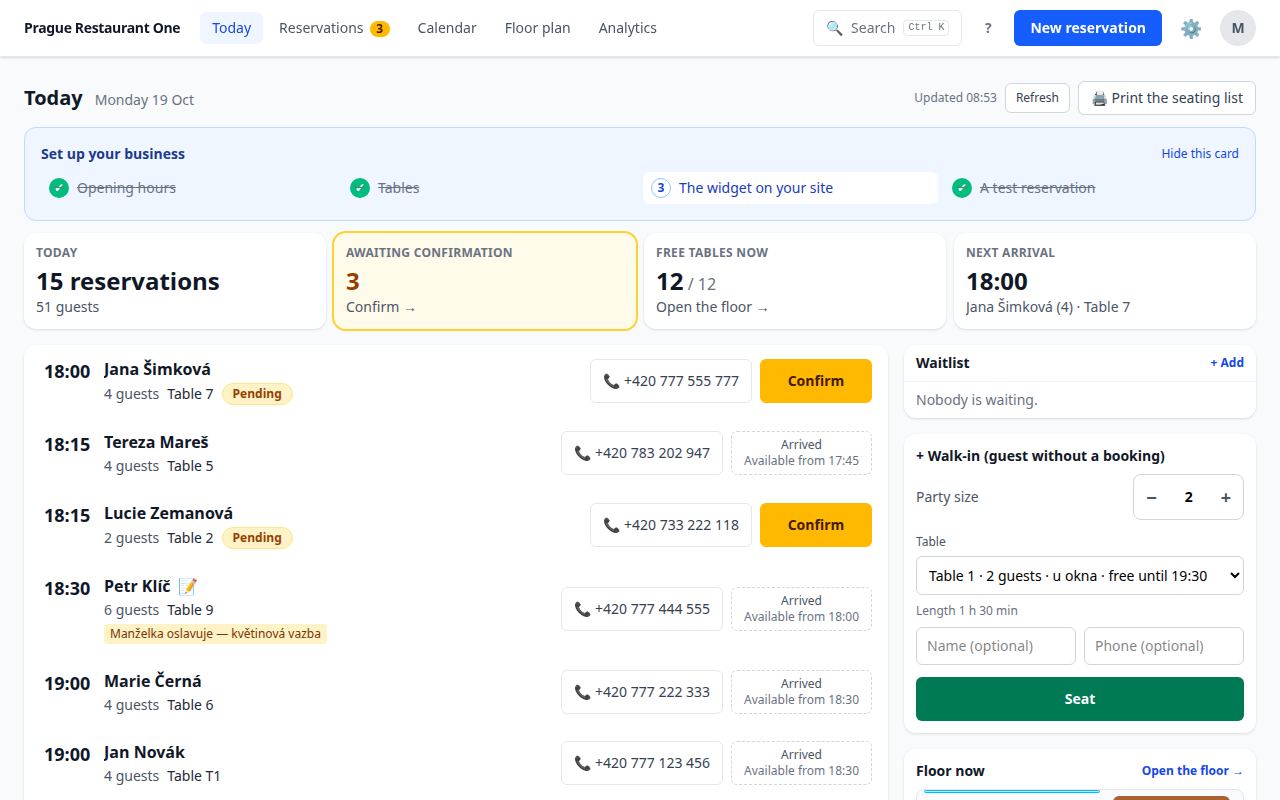
The “Today” view for the floor staff and the manager: arrivals, occupancy, guest notes and tables. Open it on a tablet at the entrance and the whole team knows what is going on.

Arrivals and confirmations

Who is coming, when, how many people and at which table. Confirm a pending booking with one tap.

Seat a walk-in

A guest walks in from the street? Enter the party size, pick a free table and click “Seat”.

Print the day sheet

Print the day's overview as a paper backup — just in case, not out of necessity.

The Today view: a summary of bookings and guests, bookings waiting for confirmation, free tables, the next arrival and a list of guests with times, tables and phone numbers.
Today — who is coming tonight, who is already seated and how many seats are left. Demo data.

Floor plan

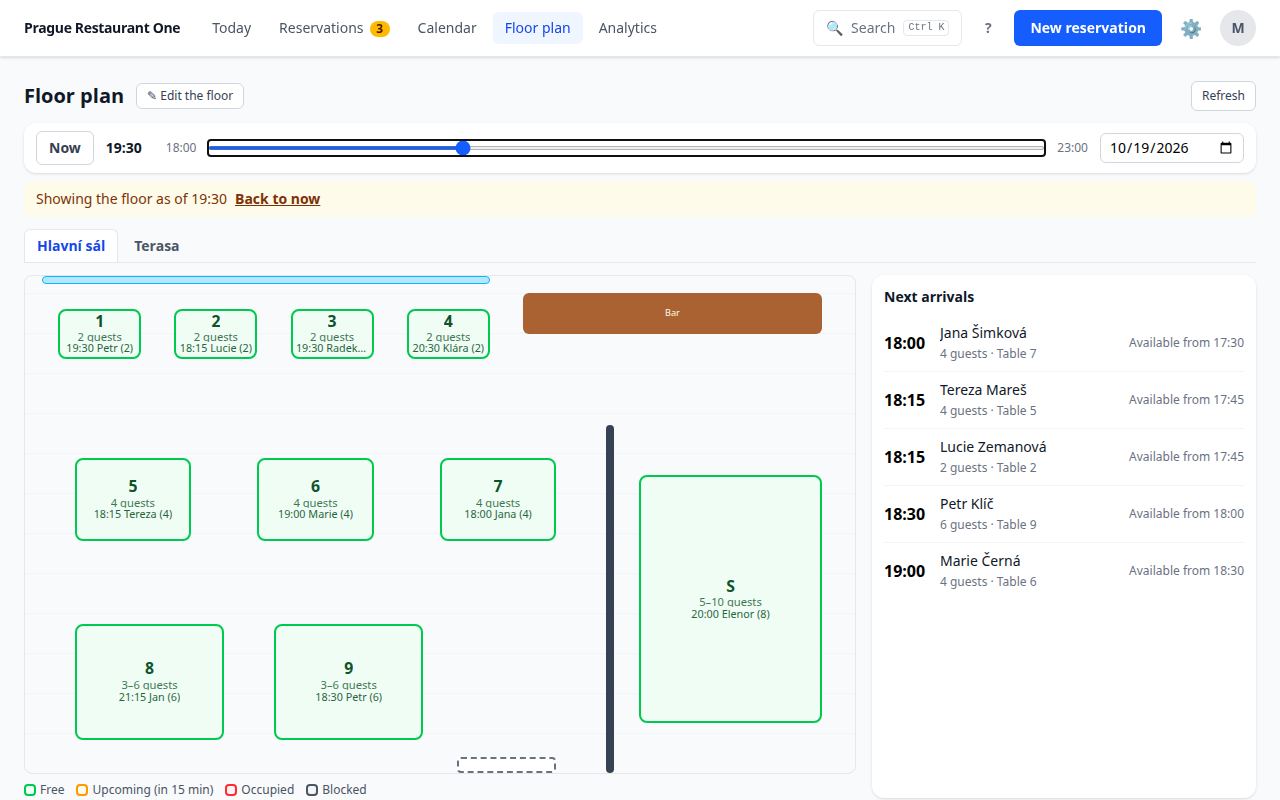
Your tables, rooms and terrace as they really are. Bookings are assigned to tables automatically.

Your real layout

The main room, a private room and the terrace as separate areas. You set each table's size and capacity.

Taken and free at a glance

Colours show free tables, taken ones and those a guest is about to reach within 15 minutes.

The state at any hour

Slide the timeline and see what the room will look like at 8:30 pm — before the guest calls.

The floor plan: tables laid out like the real room, coloured as free, taken or blocked, a timeline from 6 pm to 11 pm and a list of upcoming arrivals.
Floor — tables in their real layout, taken and free.

Statistics

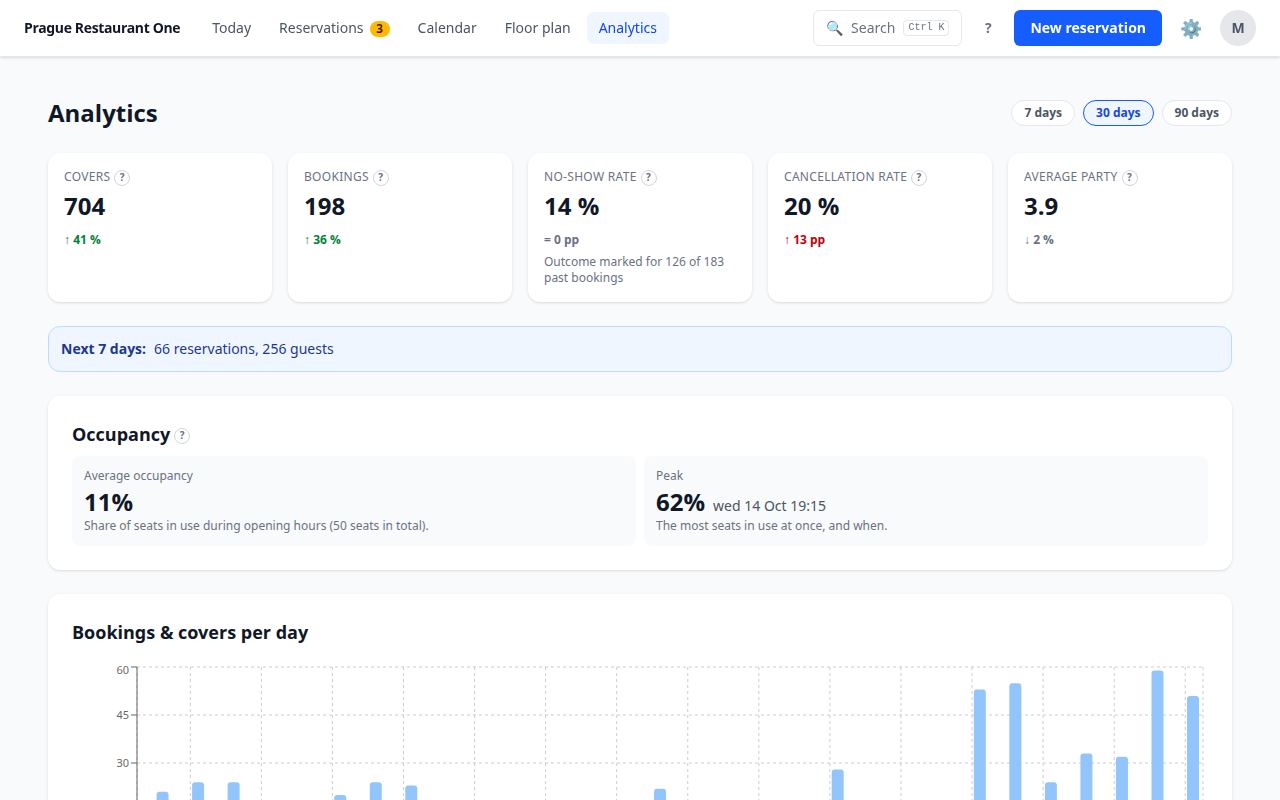
Guest counts, the busiest days and hours, no-shows — so you know when to add staff.

Guests and bookings over time

For the last 7, 30 or 90 days, compared with the previous period.

Occupancy and peak

How many seats were taken on average and when the venue was fullest.

No-shows and cancellations

The share of no-shows and cancelled bookings, so you know whom a reminder helps.

Statistics: guests, bookings, the share of no-shows and cancellations, the average party, occupancy and a chart of bookings per day.
Statistics — guests, occupancy and no-shows over time.

What your guests see

Bookings come from everywhere. You have them in one place — from the website, the phone and the door.

E-mails to guests

  • at onceBooking confirmation
  • before the visitReminder
  • any timeA link for the guest to cancel or change the booking

Texts in Czech or English, as the venue chooses.

Waitlist and phone bookings

A phone booking takes seconds to enter. When you are full, put the guest on the waitlist. When a table frees up, mark the guest as offered on the list and give them a call.

If the system is down

The booking widget on your website then shows guests your phone number. The service status and planned maintenance are published on the status page.

No website? A booking page

Every venue also has a booking page of its own. Put the link in your Google profile, on Facebook, in your e-mail signature or on the receipt.

Your team, your data

Everyone sees only what they need. And the guest data stays yours.

Staff and roles

Everyone has their own sign-in and sees only what they need. Floor staff do not need access to the settings.

Two-step verification

For owners: a passkey, an authenticator code or a backup code.

GDPR included

A data processing agreement, a privacy notice for guests, export and erasure of a guest's data in a few clicks and automatic anonymisation of old bookings. Data is stored in the EU.

Who owns the guest data

You do. We process it only on your instructions, under the data processing agreement you accept at your first sign-in. When you leave, you get an export of all your data.

Try it on your own venue

During the beta you use the system free of charge, with every feature and no commission. There is no availability guarantee (SLA) during the beta, but we publish the service status on the status page. We will tell you about the terms after the beta well in advance. Setup takes one evening.